- Vicidial base de INFORMACIÓN

- Vicidial information base

(Spanish and English)

-¿Qué podemos encontrar en el apartado del Vicidial ?

Podemos encontrar amplia información en relación a este sistema de llamadas que usamos como herramienta de trabajo, también encontraremos diversas soluciones a problemas frecuentes o razones por las cuales estas ocurren, como un medio de apoyo a nosotros los agentes virtuales.

--------------------------------------------------------------------
-What can we find in the Vicidial section?

We can find extensive information in relation to this call system that we use as a work tool, we will also find various solutions to frequent problems or reasons why they occur, as a means of supporting us virtual agents.
- ¿Cómo ingresar correctamente a vicidial?
-How to correctly enter vicidial?

- Paso 1
- Step 1

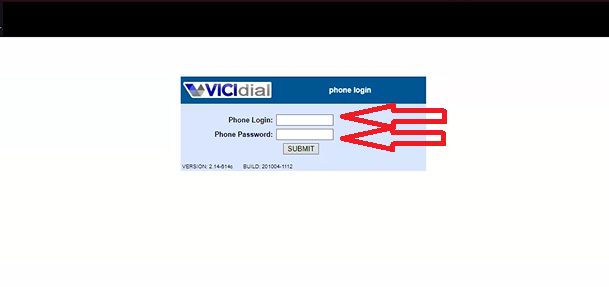
-Primero debemos colocar los datos correspondientes del Phone Login y Phone Password.

---------------------------------------------------------------------

-First we must put the corresponding data of the Phone Login and Phone Password.

- Paso 2
- Step 2

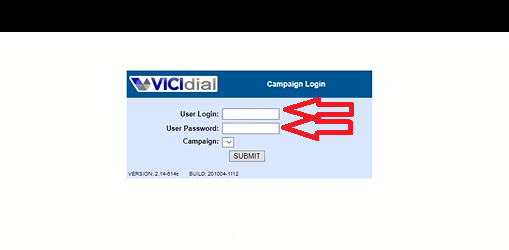
-Colocar los datos de User Login y User Password recordando que son diferentes a Phone login y Phone Password.
--------------------------------------------------------------------
-
Enter the User Login and User Password data, remembering that they are different from Phone login and Phone Password.


- Paso 3
- Step 3

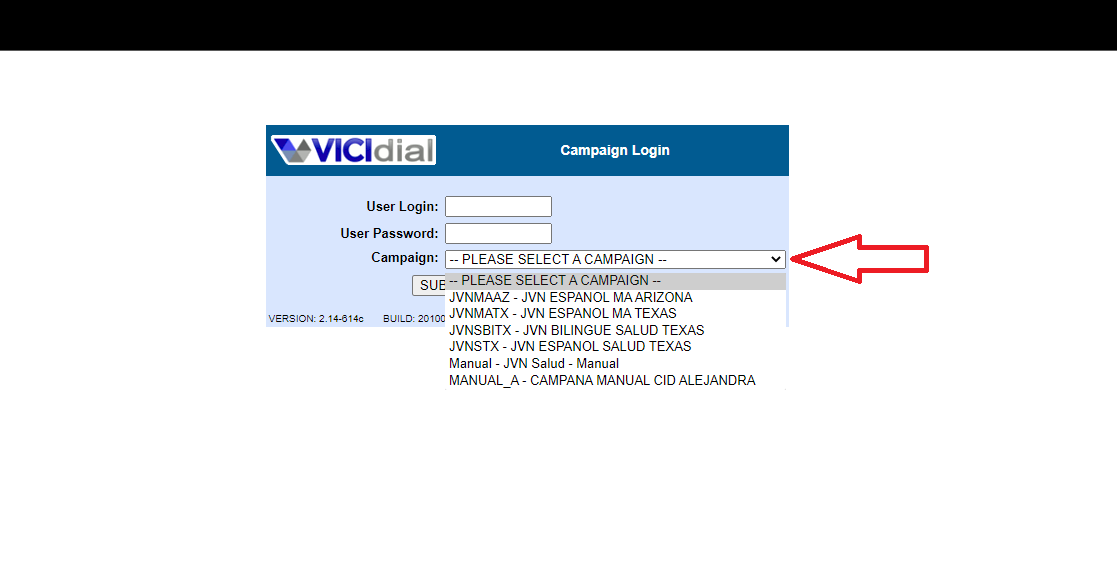
- Selecciona la campaña que te corresponde

--------------------------------------------------------
-Select the campaign that corresponds to you


- Paso 4
- Step 4


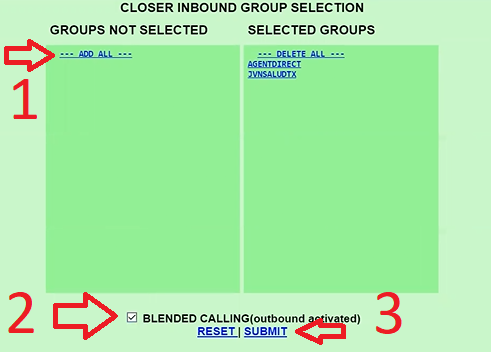
1 - Primero se hace Click en ADD ALL

2 -Segundo le das Click en BLEDED CALLING ( outbound a activated)

3 -Selecciona submit
-------------------------------------------------------
1-First click on ADD ALL

2- Second you click on BLEDED CALLING (outbound a activated)

3- Select submit

- Paso 5
- Step 5

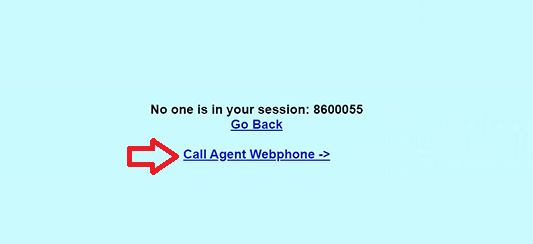
- Por último selecciona Call Agente Webphone y finalmente entras a Vicidial.
-------------------------------------------
-Finally select Call Agent Webphone and finally you enter Vicidial.

-identificación del contenido principal de vicidial


-identification of the main content of vicidial

- Conociendo Vicidial

- Knowing Vicidial

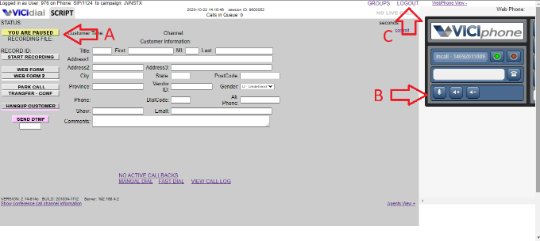
A- BOTÓN para pausar o iniciar las LLAMADAS.

B- Activar/Desactivar Mute.

C- Desconectar adecuadamente del Vicidial.
------------------------------------------------------------
A- BUTTON to pause or start CALLS.

B- Activate / Deactivate Mute.

C- Activate / Deactivate Mute.

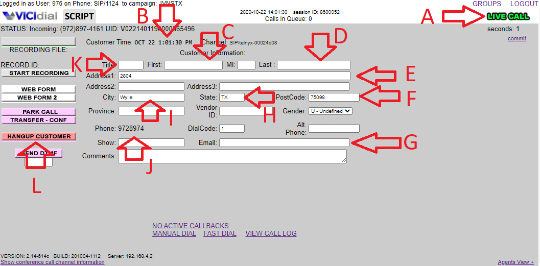
- INFORMACIÓN principal de la llamada.
-Main INFORMATION of the call.

A-Llamada en vivo

B-Hora actual de la región que se esta llamando

C-Nombre del cliente D.-Apellido del cliente

E-Dirección del cliente

F-Código postal del cliente

G-Correo del cliente

H-Estado en el que se encuentra el cliente

I-Ciudad donde vive el cliente

J-Número de Teléfono al cual se le esta llamando al cliente

K-Edad del cliente

L-Ir a disposiciones
-------------------------------------------------------
A-Live call
B-Current time of the region being called
C-Name of the client
D-Last name of the client
E-Customer address
F-Customer Zip Code
G-Customer Mail
H-State in which the client is located
I-City where the client lives
J-Telephone number to which the client is being called
K-Age of customer
L-Go to provisions

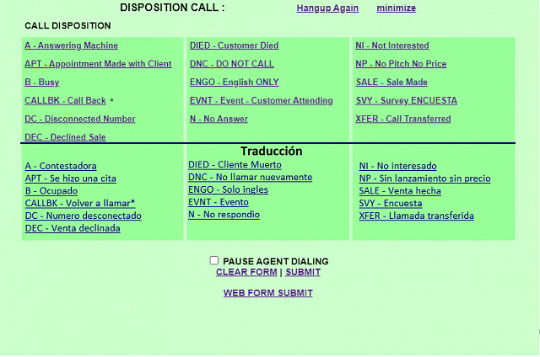
- Disposiciones en las llamadas.
- Provisions in calls

- Las disposiciones nos permite clasificar las llamadas dependiendo que tipo de resultado se obtuvo en la llamada finalizada.
---------------------------------------------------------------------
- The provisions allow us to classify the calls depending on what type of result was obtained in the ended call.

- ¿Cómo hacer call back de manera correcta ?

-How to call back correctly?

- Paso 1
- Step 1

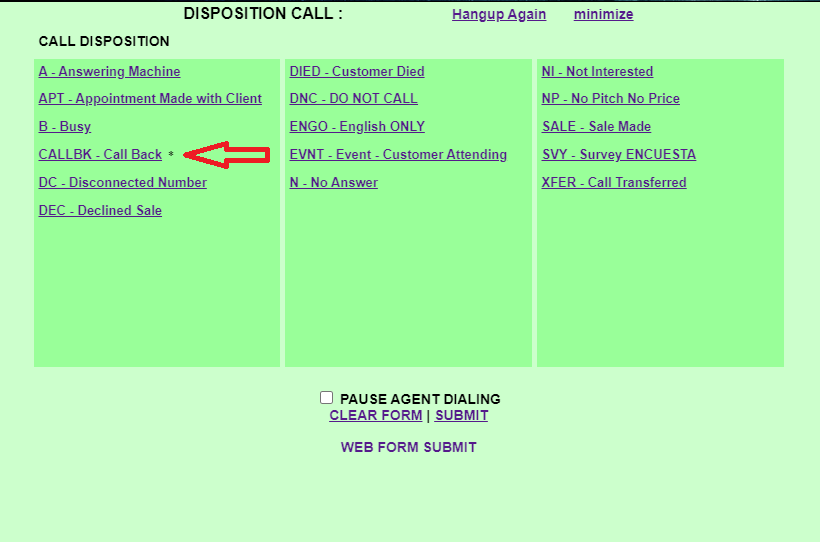
- Seleccionar call back en la DISPOSICIÓN de la llamada.
-----------------------------------------
- Select call back in the call DISPOSITION

- Paso 2
- Step 2

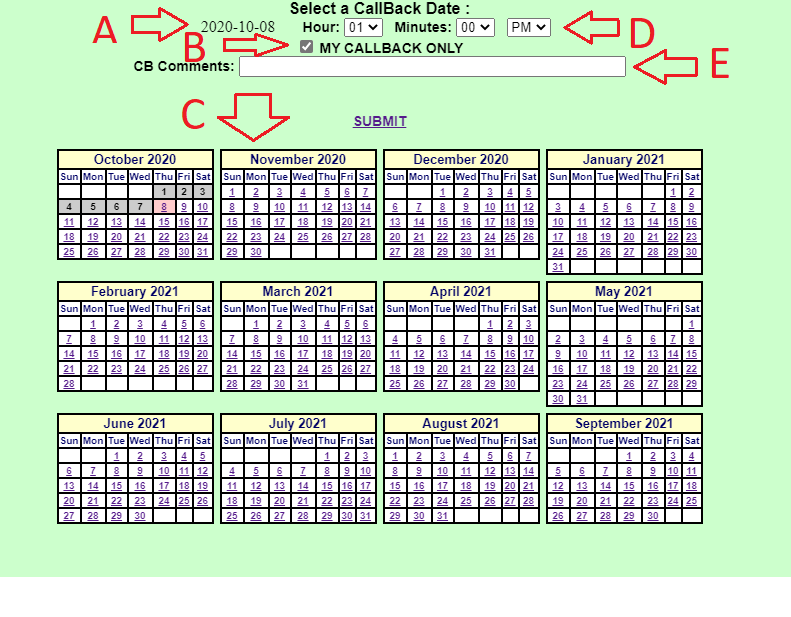
- Agendar nuestro call back

- Schedule our call back

1- Paso Flecha (B) Seleccionar MY CALL BACK ONLY.

2- Paso Flecha (C) Agendamos la fecha de la llamada.

3- Paso Flecha (A) Verificamos que se haya establecido la fecha correctamente en la cual el cliente este disponible.

4- Paso Flecha (D) Selecciones la hora pautada con el cliente

5-Paso Flecha (E) En esta casilla podemos realizar algún comentario relacionado a nuestro cliente
--------------------------------------------------------------
1- Step Arrow (B) Select MY CALL BACK ONLY.

2- Step Arrow (C) We schedule the date of the call.


3- Arrow Step (A) We verify that the date on which the client is available has been correctly established.

4- Step Arrow (D) Select the time scheduled with the client


5-Step Arrow (E) In this box we can make any comment related to our client


-¿Cómo realizar las llamadas agendadas por el call back?


-How to make the calls scheduled by the call back?

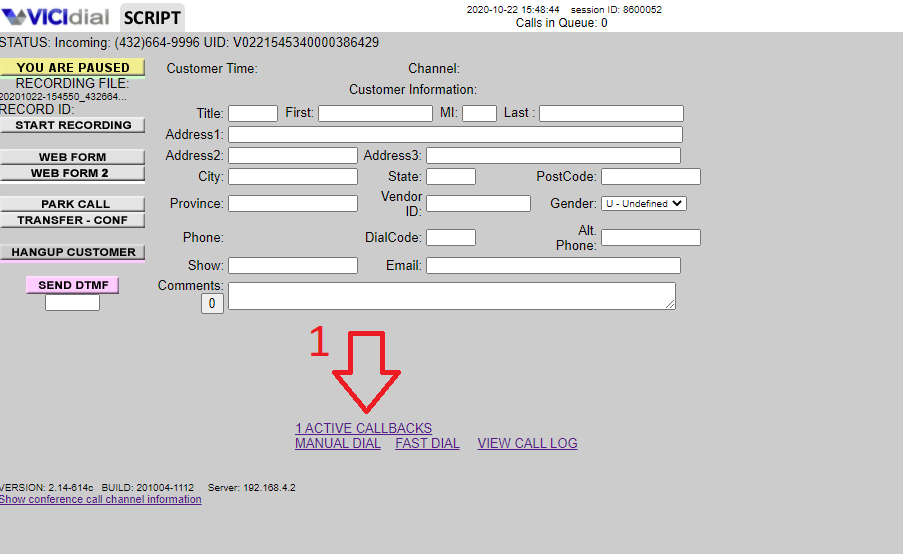
- Muchas personas cometen el error de pensar que las llamadas agendadas por el CALL BACK que son hechas para si mismos se harán automáticamente cuando llegue la hora planificada de la cita, cuando en realidad este debe realizarse de manera manual dirigiéndose a los siguientes pasos
-----------------------------------------------------
- Many people make the mistake of thinking that the calls scheduled by the CALL BACK that are made for themselves will be made automatically when the scheduled time of the appointment arrives, when in reality this must be done manually by going to the following steps
- Paso 1
- Step 1

1- Seleccionamos Active CALL BACK
----------------------------
1- Select Active CALL BACK

- Paso 2
- Step 2

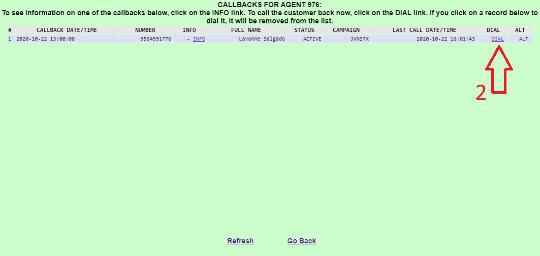
2- Seleccionamos Dial como segundo paso
----------------------------

2- Select Dial as the second step

- Paso 3
- Step 3

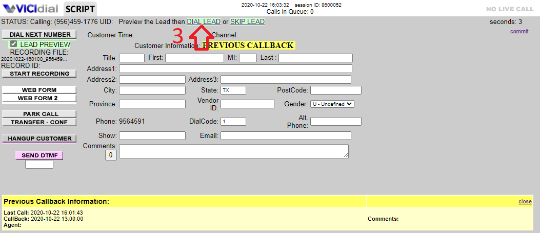
3-Por último paso Seleccionamos DIAL LEAD donde está la flecha número (3) y finalmente llamaremos a nuestro cliente
---------------------------------------------

3- Last step We select DIAL LEAD where the arrow number (3) is and finally we will call our client

- ¿DE QUÉ MANERA SE REALIZAN LAS LLAMADAS MANUALES EN VICIDIAL?

- HOW ARE MANUAL CALLS MADE IN VICIDIAL?
- Paso 1
- Step 2

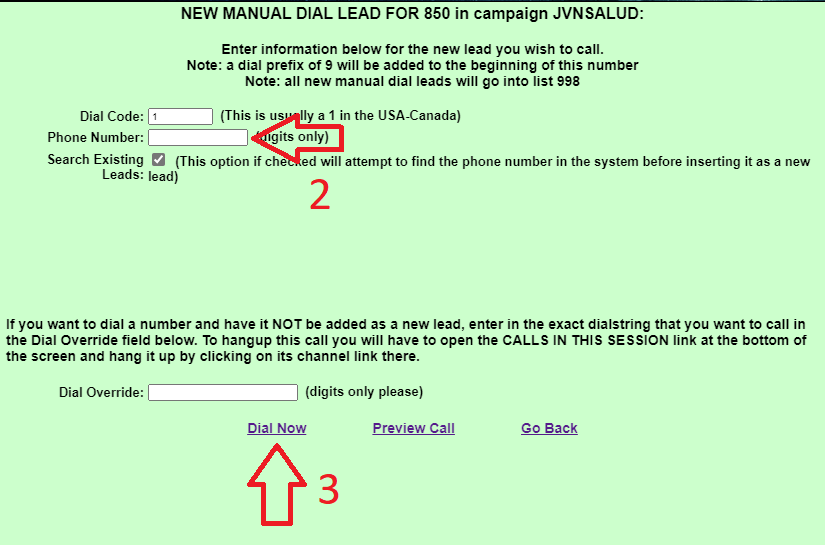
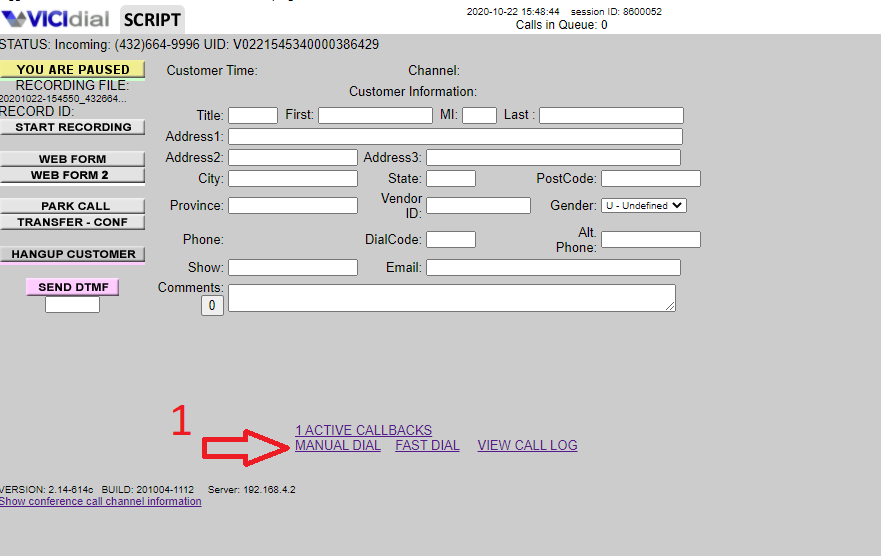
1- Para poder hacer esto debemos estar en pausa luego seleccionar donde nos indica la flecha número (1) MANUAL DIAL
------------------------------
1- In order to do this we must be paused then select where the arrow number (1) indicates MANUAL DIAL

- Paso 2
- Step 2

2-Luego nos dirigimos a Phone Number donde nos indica la flecha numero (2) y colocamos el número de TELÉFONO que queremos llamar.

3.-Por último seleccionamos Dial Now donde nos señala la flecha número (3)
------------------------------------
2- Then we go to Phone Number where the arrow number (2) indicates us and we put the PHONE number that we want to call.


3- Finally we select Dial Now where the arrow number (3) points us

Soluciones a

-Problemas comunes

-Common problems

- Mientras que el uso de VICIdial desde un lugar remoto como su casa, otra oficina o un hotel ofrece una gran cantidad de flexibilidad, hay algunas cuestiones a tener en cuenta. Lo más importante es la calidad de su Internet conexión. Muchas conexiones domésticas de banda ancha a Internet, como DSL o Cable, utilizan una arquitectura compartida, lo que significa que no se tiene un ancho de banda garantizado o una velocidad constante en un momento dado. Esto significa que si varias personas en su área están usando mucho ancho de banda, usted tiene problemas con sus operaciones de VICIdial como audio con fisuras, llamadas caídas o incluso la página web VICIdial.php no se carga correctamente.Recogimos los problemas mas comunes y sus soluciones, puedes consultarlos en nuestra base del conocimiento.

-While using VICIdial from a remote location like your home, another office, or a hotel offers a great deal of flexibility, there are a few issues to consider. The most important thing is the quality of your Internet connection. Many home broadband Internet connections, such as DSL or Cable, use a shared architecture, which means that you do not have a guaranteed bandwidth or constant speed at any given time. This means that if multiple people in your area are using a lot of bandwidth, you have problems with your VICIdial operations like cracked audio, dropped calls, or even the VICIdial.php web page not loading properly. We collected the most common problems and their solutions, you can consult them in our knowledge base.

https://ensuritygroup.bitrix24.com/knowledge/Basedeconocimiento/problemascomunes/